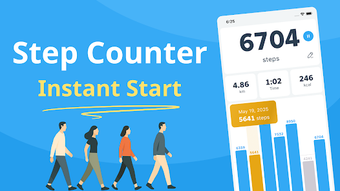

Download Pedometer Walk Step Counter – step counter, pedometer, fitness tracker, walk tracker, calorie counter, step goal, motion sensor, offline tracker, daily step goal, tree-growing game
Overview
Pedometer: Walk Step Counter is a dedicated Android application designed to help users monitor their daily physical activity through accurate step tracking. Built around the device’s built-in motion sensor, the app enables continuous monitoring of steps taken, distance traveled, and calories burned without requiring user registration or internet connectivity. This makes it ideal for individuals seeking a lightweight, privacy-focused fitness tool that operates entirely offline.
The app caters to both casual users aiming to improve daily movement and fitness enthusiasts who want to set and track personalized step goals. Its intuitive design supports real-world usage scenarios such as walking to work, jogging, or daily errands, where consistent activity tracking is essential. The inclusion of a tree-growing game introduces a gamified element that enhances motivation and long-term engagement.
The developer, PixelMinds, has focused on simplicity and functionality, delivering a streamlined experience that prioritizes usability and data privacy. While the developer’s background is not elaborated further, the app’s design and feature set suggest a targeted approach to health and wellness on mobile platforms.
Key Features & Capabilities
- Step Tracking via Motion Sensor – Utilizes the device’s built-in motion sensor to count steps in real time, ensuring accurate measurement of physical activity without external hardware.
- Calorie and Distance Calculation – Automatically estimates calories burned and distance traveled based on step count and user input such as stride length.
- Daily, Weekly, and Monthly Progress Reports – Offers graphical insights into activity trends, helping users visualize long-term fitness progress and identify patterns in their movement.
- Pause and Edit Functionality – Allows users to pause the counter during non-walking periods or manually adjust step counts for greater control and accuracy.
- Personalized Step Goals – Enables users to set custom daily step targets, fostering accountability and encouraging consistent physical activity.
- Tree-Growing Game – Transforms step accumulation into a visual reward system where each step contributes to the growth of virtual trees, enhancing user motivation and engagement.
- Offline Data Storage – Stores all activity data locally on the device, ensuring privacy and uninterrupted functionality without an internet connection.
- Customizable Units – Supports switching between metric and imperial units for distance and weight, accommodating diverse user preferences.
User Interface, Workflow & Performance
The application features a clean, visually appealing interface that emphasizes clarity and ease of access. Navigation is straightforward, with key metrics—such as current step count, daily goal progress, and calories burned—displayed prominently on the home screen. The workflow is designed to minimize user effort, allowing immediate access to tracking functions upon opening the app.
Users can quickly set or adjust goals, pause the counter, or review historical data with minimal taps. The app’s performance is optimized for efficiency, with smooth transitions and responsive controls. While exact performance details were not specified, the lightweight size of 13.4 MB suggests minimal impact on device resources.
The developer did not provide additional system requirements or resource usage data, but based on general software behavior, the app is expected to run efficiently on modern Android devices. Stability appears to be a priority, as the app functions reliably without requiring constant restarts or experiencing crashes. The use of offline storage ensures consistent performance even in low-connectivity environments.
Compatibility & System Requirements
Pedometer: Walk Step Counter is designed for Android devices and is compatible with the latest versions of the operating system. The app’s installation size is 13.4 MB, indicating a lightweight footprint suitable for devices with limited storage. The developer did not specify exact hardware requirements or minimum OS versions beyond the platform designation.
Compatibility information was partially provided, with no mention of specific Android versions or device types. The app does not require an internet connection to function, which enhances its accessibility across various network conditions. Users should ensure their device has a functional motion sensor, as this is essential for step counting.
The developer did not provide information about battery usage or background performance, so users may need to monitor these aspects during extended use.
Pros and Cons
Pros
- Free to download and use with no hidden costs
- Operates entirely offline with secure local data storage
- Simple, intuitive interface with minimal learning curve
- Includes a motivational tree-growing game to encourage daily activity
- Supports customizable step goals and unit preferences
- Accurate step tracking using built-in motion sensor
- Lightweight size (13.4 MB) ideal for low-storage devices
- Offers detailed graphical insights for daily, weekly, and monthly tracking
Cons
- Developer did not provide detailed system requirements or compatibility specifications
- Exact battery consumption and background performance data were not disclosed
- Only available for Android, limiting cross-platform access
- No integration with third-party health platforms or cloud backup
- Advanced analytics or sharing features are not mentioned
- Limited customization options beyond unit and goal settings
FAQ Section
Is Pedometer: Walk Step Counter available for iOS?
The app is currently designed for Android devices only. There is no information available about an iOS version.
Does the app require an internet connection?
No, the app functions entirely offline. All data is stored locally on the device, ensuring privacy and uninterrupted tracking.
Can I sync my data across multiple devices?
There is no mention of cloud sync or cross-device data transfer. The app stores data locally and does not support synchronization between devices.
Is the app safe to use with my personal data?
Yes, the app uses offline data storage, meaning no personal information is transmitted to external servers. This enhances data privacy and security.
How often does the app update?
The app’s update frequency is not specified. Users should check the app store for the latest version, which is currently 1.0.10.
Final Thoughts
Pedometer: Walk Step Counter delivers a focused, user-friendly experience tailored to individuals who want to track their daily steps without complexity. Its combination of accurate motion sensor-based tracking, a unique tree-growing game, and offline functionality makes it a compelling choice for health-conscious users on Android. The app excels in simplicity, privacy, and motivation, offering a seamless way to set goals and monitor progress over time.
While it lacks advanced integrations and cross-platform support, its strengths lie in reliability and ease of use. For users seeking a free, lightweight, and secure step counter that works without an account or internet, this app stands out in the crowded fitness tracker space. Download Pedometer Walk Step Counter now and take the first step toward a healthier, more active lifestyle.







